


Printo.love
Guest album and video wall

Photo album for your guests

Guests see themselves on the screen, laugh, take more pictures, and become part of the entertainment. And you get hundreds of candid photos that no single photographer would have time to take.

  • No apps needed
  • AI moderation
  • Matches your invitation
How it works

The photo's journey from a phone to the screen at the venue

You set up the album and wall in your project just once. Then it runs itself while you celebrate.

  1. 1

    Guest scans the QR code

    The code is on the tables, in the invitation, and on the screen itself. The album opens directly in their phone's browser.

  2. 2

    Uploads photos and videos

    Photos are rotated and resized for the screen, videos are converted, and iPhone formats are supported too.

    Event album

    All originals are saved and can be downloaded as a single archive.

  3. 3

    AI checks the photo

    In seconds, before the room sees it. Videos are checked using a freeze-frame.

    Inappropriate content is hidden

    The photo just stays in the moderator's queue.

  4. 4

    Photos on the video wall

    In your chosen mode and matching your design. Guests see themselves and take even more photos.

    Moderator remote

    Pause, show a specific photo, or hide unwanted ones.

Wall modes

Three ways to display photos

You can change the mode right during the event: the wall will switch automatically without needing a reload.

Mode 1 / 3

Cinema

One photo full screen

Photos transition full screen with a smooth zoom, just like a big-screen slideshow. Every guest gets their moment of fame.

  • Photo display time from 3 to 30 seconds
  • Smooth camera zoom, which can be turned off
  • QR code for uploading in the corner of the screen

Perfect for a projector or a big screen above the dance floor.

Mode 2 / 3

Grid

Live collage of recent photos

Multiple photos appear on the screen at once. New ones replace the oldest, so the collage is constantly updating.

  • From 3 to 9 photos at a time
  • Background color to match the venue decor
  • New photos appear first

Great for when there are many guests and a constant stream of photos.

Mode 3 / 3

Polaroid

Cards on a table

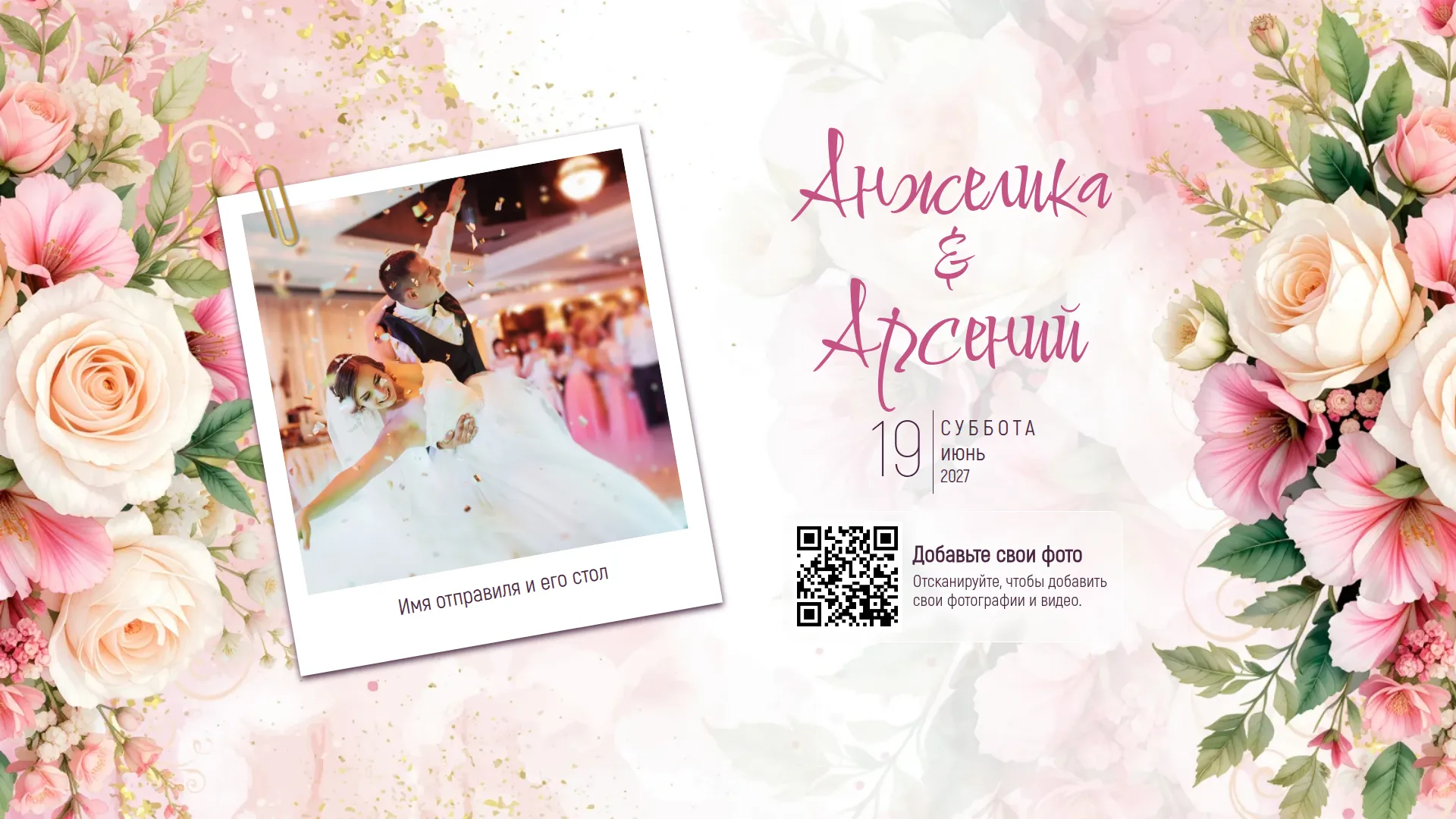
Photos land on the screen like Polaroid pictures on a table, complete with the author's name. The background, fonts, and decorations are taken from your invitation design.

  • Screen layout matches your design
  • Guest's name under each photo
  • Your text and decorations in the background

The most "wedding-like" mode, also shown in the demo below.

AI moderation

Nothing inappropriate makes it to the screen

Every photo and video is first checked by AI. It instantly approves normal party shots but hides anything inappropriate in the moderator's queue.

  • Decisions take seconds, guests don't wait
  • Doesn't flag blurry or grainy photos
  • The final say is human: the moderator can restore or remove any photo

Approve for screen

  • Kisses and hugs
  • Dancing and games
  • Glasses at the reception
  • Blurry and accidental photos
  • Swimsuits by the pool

Hide from the room

  • Nudity
  • Explicit content
  • Violence and injuries
  • Hate symbols
Moderator dashboard

The wall is controlled by your person at the venue

Give the remote link to a friend, planner, or MC. The remote opens on their phone with a password, with no account or access to the rest of your project needed.

  • New photos queue

    Approve or hide them one by one or in bulk.

  • Push photo to screen now

    Push a specific photo to the wall out of turn: a toast, the first dance, or grandma in the middle of the room.

  • Pause and turn off the wall

    Stop the slideshow during speeches and vows with a single tap.

  • Guest uploads

    Open and close uploads whenever you need to.

  • Nothing gets lost

    Hidden photos are kept in their own tab, and any can be restored.

Demo

Try it right now

This is a real video wall. Choose a mode, scan the QR code with your phone, upload a photo, and it will appear on the screen after the AI check.

And more

Little things that make the night

Photos and videos

Photos and videos from the gallery or straight from the camera, including iPhone formats.

Likes and captions

Guests like their favorite photos, and the author's name is shown below.

Privacy

Password-protect the album, and choose to show each guest only their own photos.

Time-limited uploads

The album only accepts photos during the event.

Home screen

While there are no photos, the wall displays your names, a countdown, and a QR code.

All originals

After the event, guests' photos and videos can be downloaded as a single archive.

Q&A

Frequently asked questions

Do guests need to install an app?

No. The album opens in a standard mobile browser via a QR code or link. No registration is required.

What do I need for the video wall at the venue?

Any screen or projector with a browser: a TV, a laptop with a projector, or the venue's screen. Just open the wall link and turn on full-screen mode.

Who can be a moderator?

Anyone you give the remote link and password to: a friend, planner, or MC. The remote opens on their phone without an account or access to the rest of the project.

How long are the photos stored?

Photos and videos are stored in the project album after the event, and all originals can be downloaded as an archive. The demo album on this page is deleted after a week.

Can I limit the upload time?

Yes. You can open uploads only during the event and password-protect the album.

Let wedding planning be part of the celebration

Create a project, choose a design, and start inviting guests today.